
Sentry sink
If you are using Sentry for error monitoring, you can use the Sentry sink to send log messages to Sentry using @logtape/sentry package:
deno add jsr:@logtape/sentrynpm add @logtape/sentrypnpm add @logtape/sentryyarn add @logtape/sentrybun add @logtape/sentryNOTE
For Deno, you need both @sentry/deno and @sentry/core at the same version (e.g., both at 9.41.0) due to Sentry's exact version pinning.
Basic usage
The quickest way to get started is to use getSentrySink() without any arguments:
import {  } from "@logtape/logtape";
import {  } from "@logtape/sentry";

await ({
  : {
    : (),
  },
  : [
    { : [], : ["sentry"], : "debug" },
  ],
});
By default, only error and fatal level logs are captured as Sentry events.
Using your Sentry SDK namespace
This feature is available since LogTape 2.2.0.
If your application initializes Sentry through a framework SDK such as @sentry/nextjs or @sentry/react-native, pass the same namespace object to getSentrySink():
import * as  from "@sentry/nextjs";
import {  } from "@logtape/logtape";
import {  } from "@logtape/sentry";

.init({ : .. });

await ({
  : {
    : ({ :  }),
  },
  : [
    { : [], : ["sentry"], : "debug" },
  ],
});
This ensures LogTape uses the same Sentry module instance for captures, active spans, isolation scopes, and structured logs. It is useful in monorepos or multi-platform apps where package resolution can install multiple @sentry/core versions.
Trace correlation
This feature is available since LogTape 1.3.0.
When using Sentry's performance monitoring, logs automatically correlate with active traces and spans. This happens with zero configuration:
import * as  from "@sentry/node";
import {  } from "@logtape/logtape";

const  = ("app");

.({ : "process-order" }, () => {
  .("Processing order", { : 123 });
  // Log automatically includes trace_id and span_id
});
The trace context (trace_id, span_id, parent_span_id) is automatically captured from active Sentry spans and included in all logs, breadcrumbs, and events.
Breadcrumbs
This feature is available since LogTape 1.3.0.
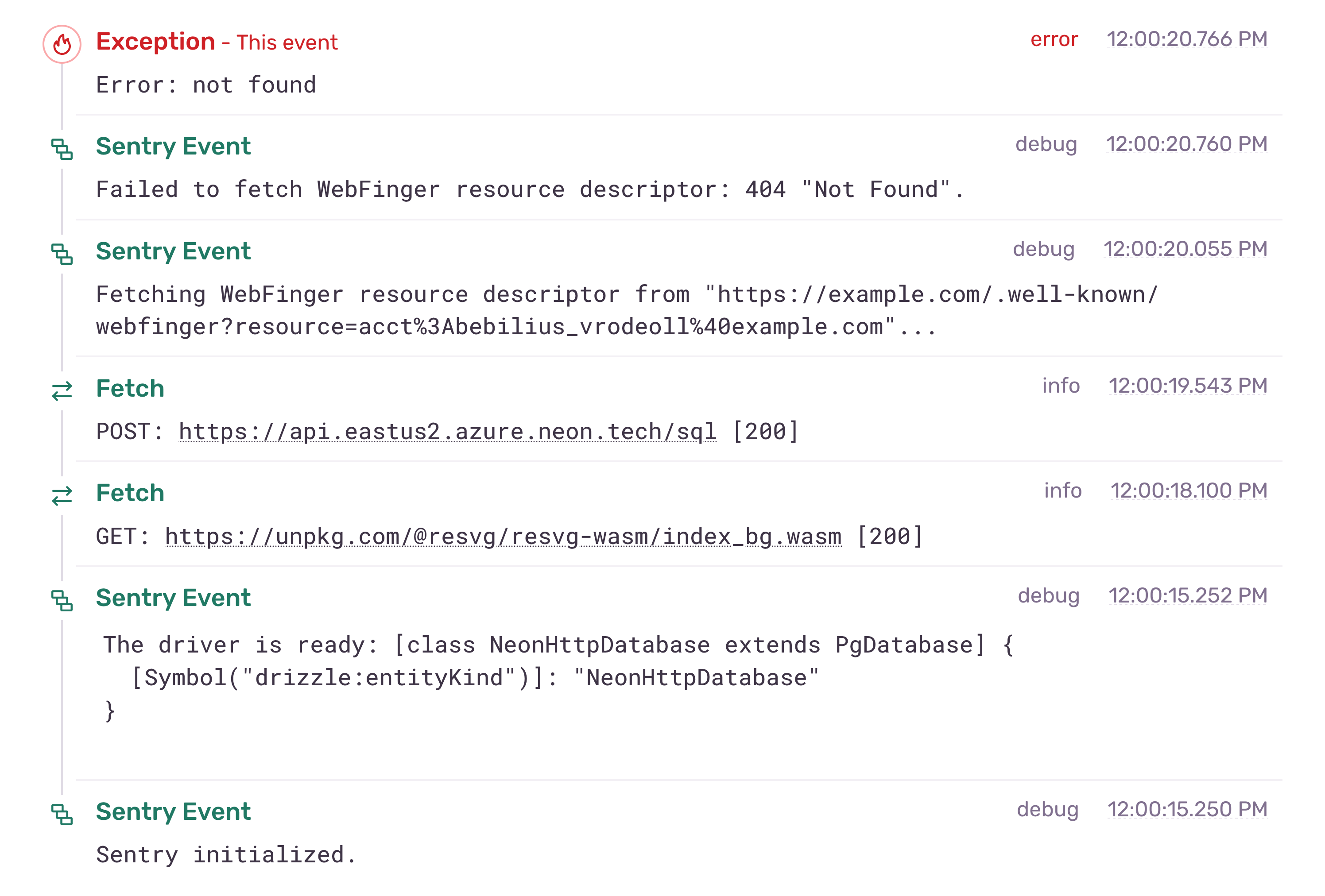
You can enable breadcrumbs to create a debugging context trail that shows what happened before errors:
import * as  from "@sentry/node";
import {  } from "@logtape/logtape";
import {  } from "@logtape/sentry";

.({ : .. });

await ({
  : {
    : ({
      : true,
    }),
  },
  : [
    { : [], : ["sentry"], : "info" },
  ],
});
When enabled, non-error log levels become breadcrumbs in Sentry, providing complete context for debugging. Use LogTape's lowestLevel to control which logs reach the sink.
You can also configure which levels become breadcrumbs:
import * as  from "@sentry/node";
import {  } from "@logtape/logtape";
import {  } from "@logtape/sentry";

.({ : .. });

await ({
  : {
    : ({
      : {
        : "info",
        : "warning",
      },
    }),
  },
  : [
    { : [], : ["sentry"], : "debug" },
  ],
});
The old enableBreadcrumbs option is still supported, but it is deprecated. Use breadcrumbs: true instead.
Structured logging
This feature is available since LogTape 1.3.0 (requires Sentry SDK 9.41.0+).
Send structured, searchable logs using Sentry's Logs API:
import * as  from "@sentry/node";
import {  } from "@logtape/logtape";
import {  } from "@logtape/sentry";

.({
  : ..,
  // Sentry SDK 9.41.0 through 10.x only; remove this line on SDK 11+,
  // which no longer has this option:
  : true,
});

await ({
  : {
    : (),
  },
  : [
    { : [], : ["sentry"], : "debug" },
  ],
});
The sink automatically detects when the Logs API is available (SDK 9.41.0+) and uses it for structured logging. When unavailable, logs are sent as events and breadcrumbs only.
Whether the Logs API actually captures logs is up to the Sentry SDK. Sentry SDK 9.41.0 through 10.x capture them only when enableLogs: true is passed to Sentry.init(). Sentry SDK 11.0.0 captures them without it, and since it removed the enableLogs option, passing it there fails type checking.
Use the logs.level option to set the minimum level sent through Sentry's Logs API:
import * as  from "@sentry/node";
import {  } from "@logtape/logtape";
import {  } from "@logtape/sentry";

.({
  : ..,
  : true,  // Remove this line on Sentry SDK 11+
});

await ({
  : {
    : ({
      : { : "warning" },
      : { : "trace", : "info" },
    }),
  },
  : [
    { : [], : ["sentry"], : "trace" },
  ],
});
This sends warning and higher records to Sentry's Logs API while keeping lower levels as breadcrumbs for later error reports.
Routing logs and breadcrumbs by level
This feature is available since LogTape 2.3.0.
Sometimes you may want verbose records to appear only as breadcrumbs, while sending higher-level records to Sentry's Logs API. Do not use withFilter() for this case, because it filters records before they reach the Sentry sink and therefore prevents them from becoming breadcrumbs.
Configure the sink-level logs and breadcrumbs options instead:
import * as  from "@sentry/node";
import {  } from "@logtape/logtape";
import {  } from "@logtape/sentry";

.({
  : ..,
  : true,  // Remove this line on Sentry SDK 11+
});

await ({
  : {
    : ({
      : { : "warning" },
      : { : "info" },
    }),
  },
  : [
    { : [], : ["sentry"], : "trace" },
  ],
});
In this configuration, trace, debug, and info records become breadcrumbs. warning, error, and fatal records are sent through Sentry's Logs API. Error-level records still create Sentry issues as described below.
Filtering and transformation
This feature is available since LogTape 1.3.0.
You can use beforeSend to filter or transform log records before they are sent to Sentry:
import * as  from "@sentry/node";
import {  } from "@logtape/logtape";
import {  } from "@logtape/sentry";

.({ : .. });

await ({
  : {
    : ({
      : () => {
        // Filter out debug logs
        if (. === "debug") return null;

        // Redact sensitive data
        if (..) {
          return {
            ...,
            : { ...., : "[REDACTED]" }
          };
        }

        return ;
      },
    }),
  },
  : [
    { : [], : ["sentry"], : "debug" },
  ],
});
Returning null from beforeSend drops the log record entirely, including structured logs, events, and breadcrumbs. Use logs.level and breadcrumbs when you only need level-based routing between Sentry outputs.
Event capture
This feature is available since LogTape 1.3.0.
All error and fatal level logs create Sentry Issues. If the log contains an Error instance in its error property or Pino-style err property, captureException is used for better stack traces. Otherwise, captureMessage is used:
import {  } from "@logtape/logtape";

const  = (["my-app"]);

// Creates Issue with stack trace (uses captureException)
.("Database connection failed", { : new ("timeout") });
.("Job failed", { : new ("timeout") });

// Creates Issue without stack trace (uses captureMessage)
.("User not found: {userId}", { : 123 });

// Does NOT create Issue - goes to structured logs and/or breadcrumbs only
.("Request received", { : "/api/users" });
You can customize which property names are checked for an Error instance with the errorPropertyNames option. Names are checked in order, and the first matching Error is sent to captureException:
import * as  from "@sentry/node";
import {  } from "@logtape/logtape";
import {  } from "@logtape/sentry";

.({ : .. });

await ({
  : {
    : ({
      : ["exception", "error", "err"],
    }),
  },
  : [
    { : [], : ["sentry"], : "error" },
  ],
});
All logs are sent to Sentry's structured logging by default when the Logs API is enabled. Non-error logs can become breadcrumbs when breadcrumbs is enabled, providing full context when errors occur.
For more details, see the getSentrySink() function and SentrySinkOptions interface in the API reference.